InstaClip
Built an app that collapses the entire short-form video workflow into one guided flow, idea to published in minutes.
Head of Product

Discovery
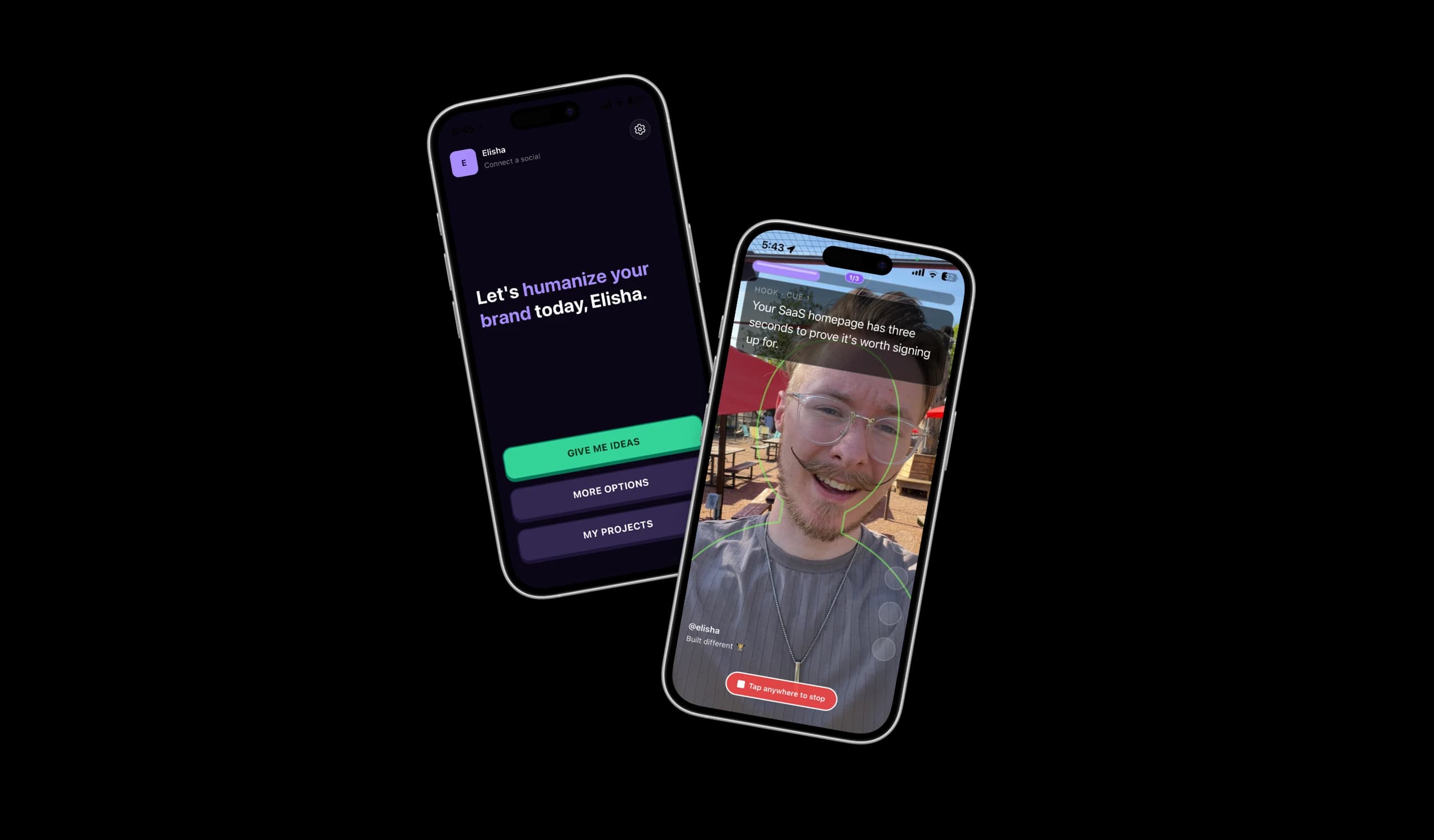
When running Marky, we found the businesses growing fastest weren't using AI content. They were posting videos of themselves. But the process was painful: scripts in ChatGPT, bullet points taped to a windshield, CapCut for editing, five socials for posting. InstaClip collapses all of that into one guided flow.
The content that worked best was the hardest to make
We'd been serving social media for years at Marky and noticed a pattern. The businesses growing fastest were the ones showing up on camera. A real person talking to the camera outperformed everything else, but almost nobody was doing it consistently.
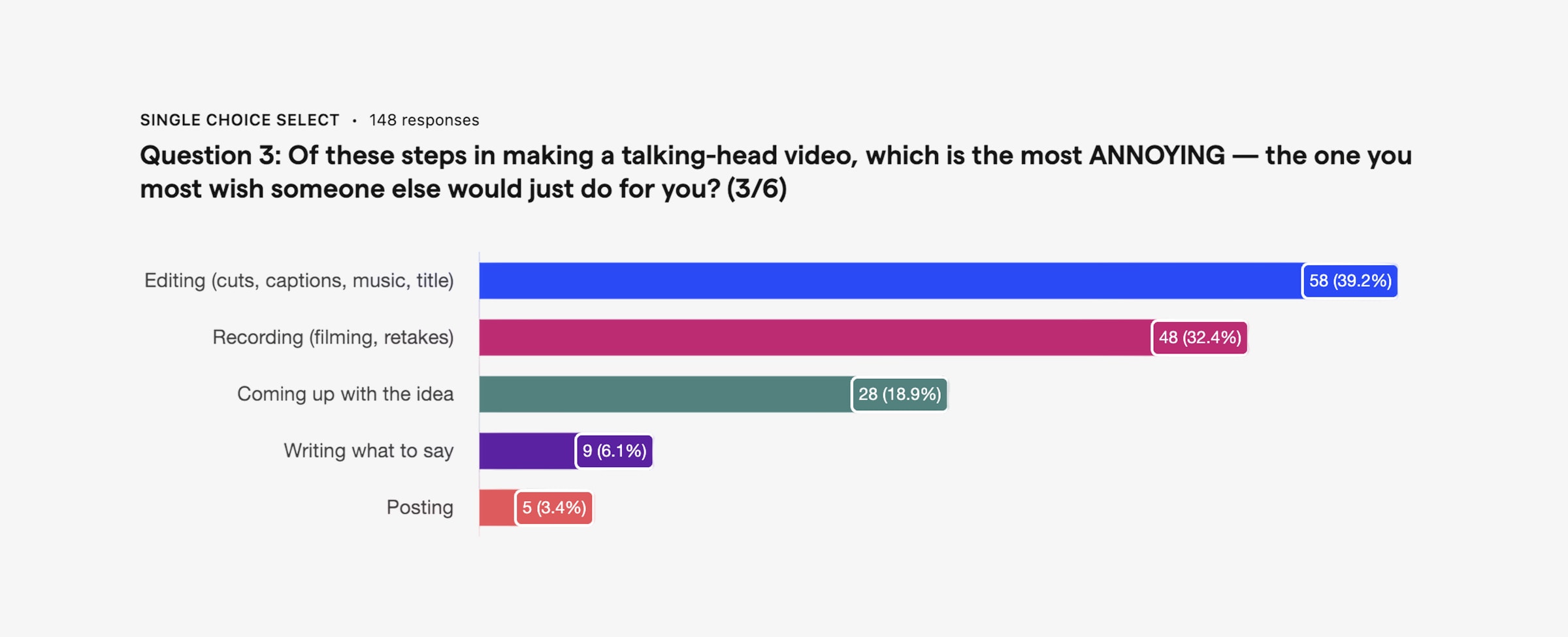
Survey responses from Marky painted a clear picture: 66% said going from idea to published video took over an hour. The problem wasn't any single step. It was the entire pipeline. And the stakes were high, users who posted consistently saw 4.5x more engagement than those who didn't. Every minute of friction was compounding against them.
Selling a service before building a product
My brother and I took a different approach than when we started Marky. Instead of jumping into product, we ran a concierge service for several months. We helped a few customers create video content by hand. This helped measure willingness to pay and understand the job simultaneously.
Committing to solving the problem end-to-end before marrying ourselves to a particular solution meant we weren't locked into our assumptions. We used what would've been our competitors' tools to serve customers (teleprompter apps, CapCut, Opus) and experienced their strengths and gaps firsthand. We built a few small internal tools to fill those gaps as we found them, and that's eventually what became the product.
Shadowing the pros
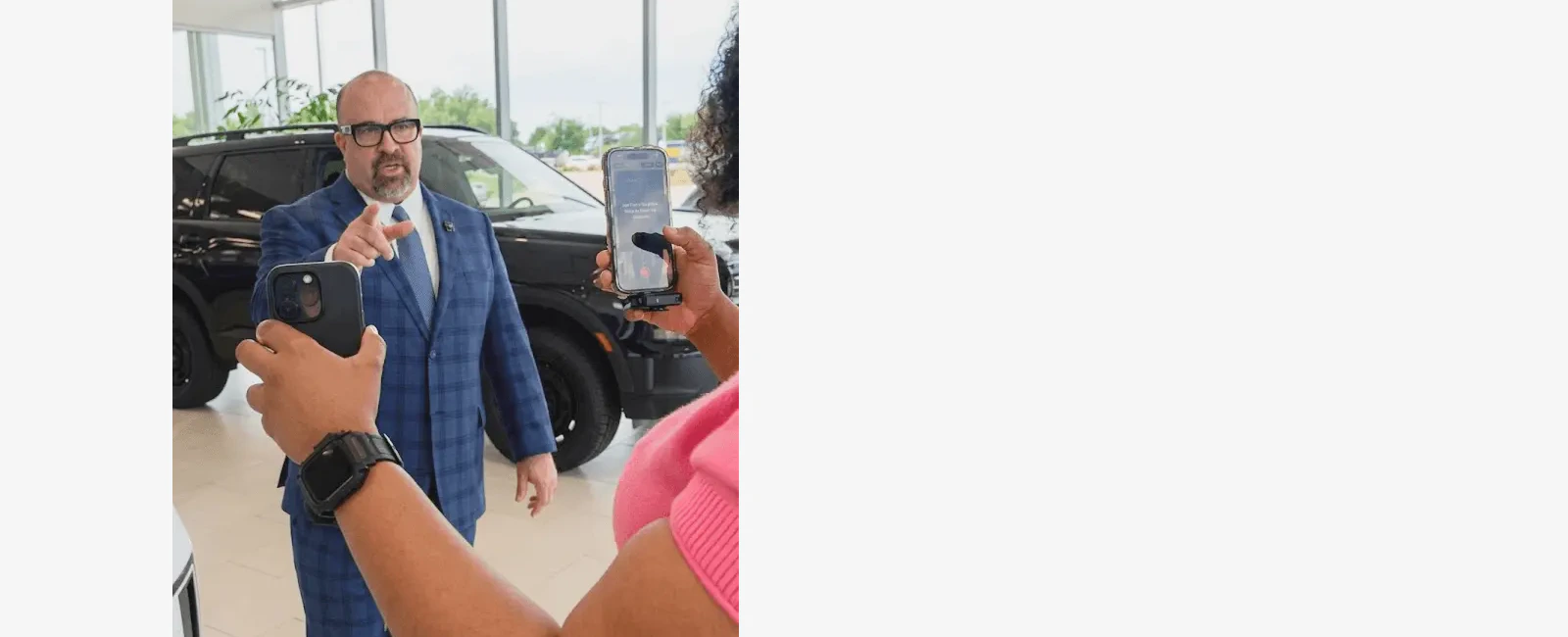
In addition to solving the problem ourselves, we shadowed a professional content creator and his assistant for days, watching how they actually recorded. The assistant would load in the script, set everything up, and tell her boss "okay, ready for you, just go in there and record." It was fast, structured, and low-friction. That workflow became the model for what we wanted the app to feel like. Our app is the "Julie" for people who don't have a Julie.
Validating the idea
Why existing solutions don't work
Every approach we found had a fundamental tradeoff. Long-form-to-short-form tools like Opus chop recordings into clips, but thoughts expand to fill the time, and a thirty-second clip from a five-minute take is always an incomplete thought. Teleprompters solve structure but kill delivery. Viewers detect the horizontal eye movement, hands get less expressive, and one user told me it "became more of a distraction" than a help. Winging it has the best energy but often lacks structure.
We experienced this firsthand making content for Marky. Scripted takes sounded stiff. Off-the-cuff rambling fell apart. The format that consistently worked: chunking a script into small pieces and recording each one conversationally.
The cue card system
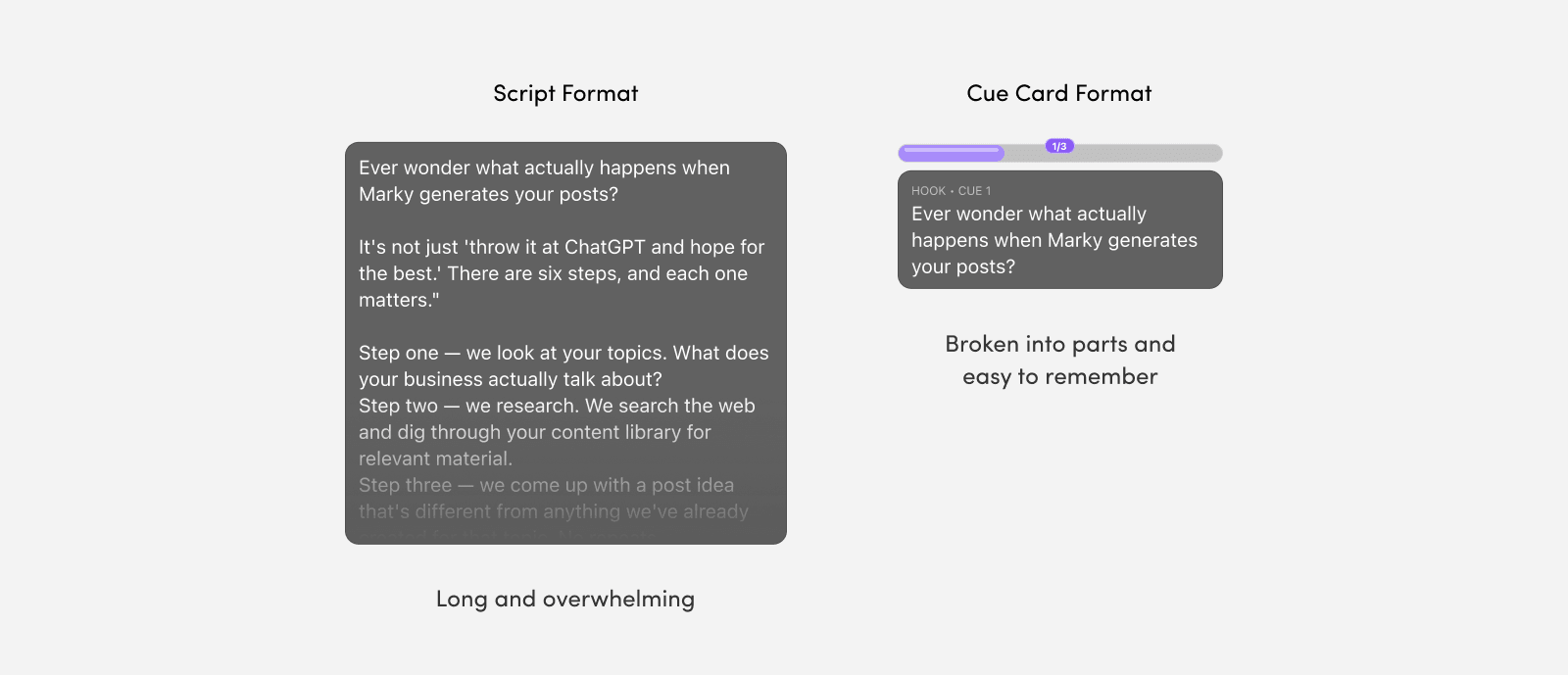
That's where the cue card system was born. Instead of scrolling a full script, we break it into bite-sized chunks. You see a cue of maybe two sentences, familiarize yourself with the idea, then record yourself saying it in your own words. The cue disappears while you're recording so you're not tempted to read verbatim. Then you move to the next cue. Each piece is short enough to nail in one take, editing is straightforward, and you get the momentum of breaking a big task into small wins.
Defining who this is for, and what we're not building
Our ICP crystallized through the interviews: business owners and sales reps who know they need to post video but aren't doing it consistently. They aren't editing pros. They don't want to "just send it" either. They want some level of scripting and polish. They struggle with internal barriers as much as practical ones: insecurity on camera, not knowing what to say, the weight of knowing they should be doing this but aren't.
Equally important was defining what we weren't building. InstaClip isn't a full video editor. CapCut can handle that. It's not for cinematic or polished brand content. That's agency work. We're solving one specific job: help me go from idea to published talking-head video in a tenth of the time (Jobs to Be Done). That constraint helped us keep the product simple and focused.
Building V1
Vibe coding as a design tool
After some cursory wireframes, we did something different for the first prototype. Instead of going high-fidelity in Figma, we vibe-coded the app in a weekend, producing a fully functional prototype we could actually use and test. While unconventional, this was the most effective design tool we had.
We knew that for an app like this, a big part of design is flow. How it feels to move through screens, the rhythm of recording, the micro-moments between steps. You can't get that from a static mockup, and even Figma prototypes only approximate it. A real, working app let us play with the product, focus on value rather than pixels, and put it in users' hands before committing to any architecture.
After getting some initial insights, we scrapped the whole thing. We took our key findings and rebuilt from scratch as a React Native app using Expo and Claude Code, starting with only the features that were absolutely necessary.
Product pillars
Three principles guided every decision in the rebuild.
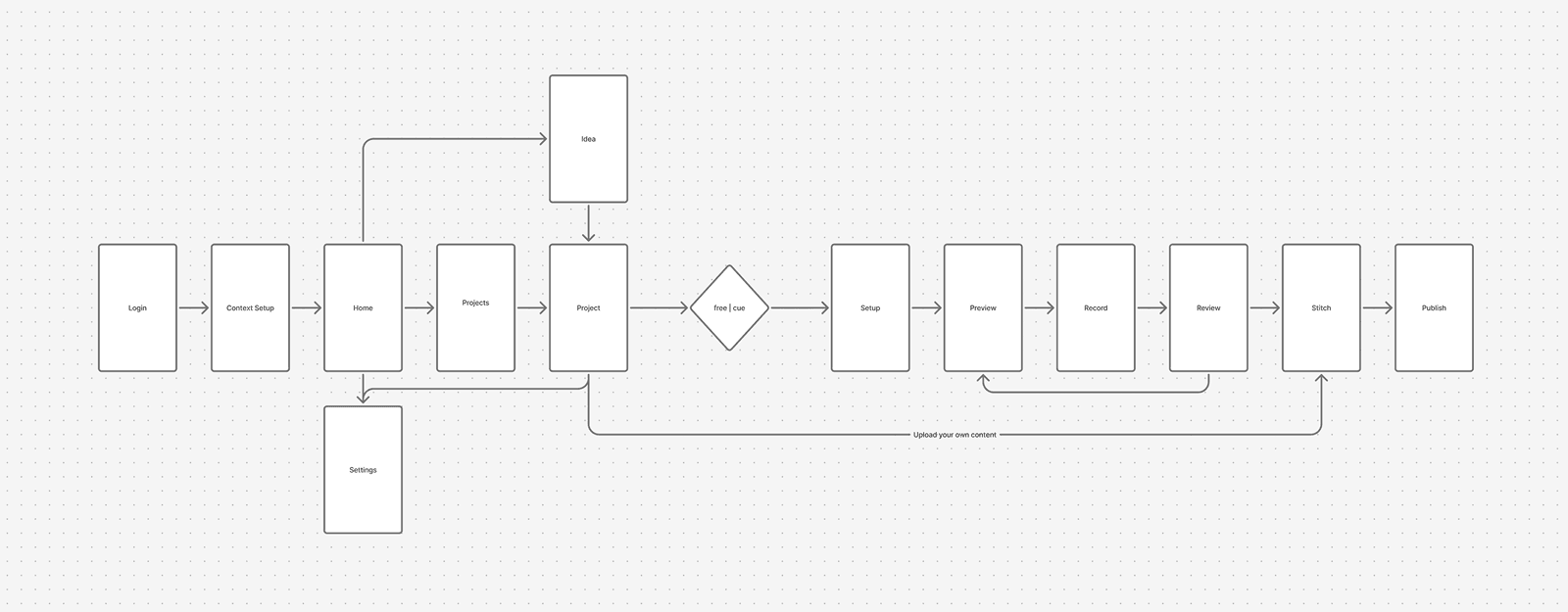
One primary action. Every screen should be self-evident (Don't Make Me Think). If you weren't thinking and just tapped whatever was most obvious, you'd make it through the entire flow. We drew heavily from Duolingo's onboarding: progressive checkpoints, emotional safety, and making the experience feel achievable rather than overwhelming.
Speed over options. Our research showed that over-edited videos actually perform worse for talking-head content. People want authentic content, not polished. That freed us to cut features aggressively and optimize every step for speed instead of capability.
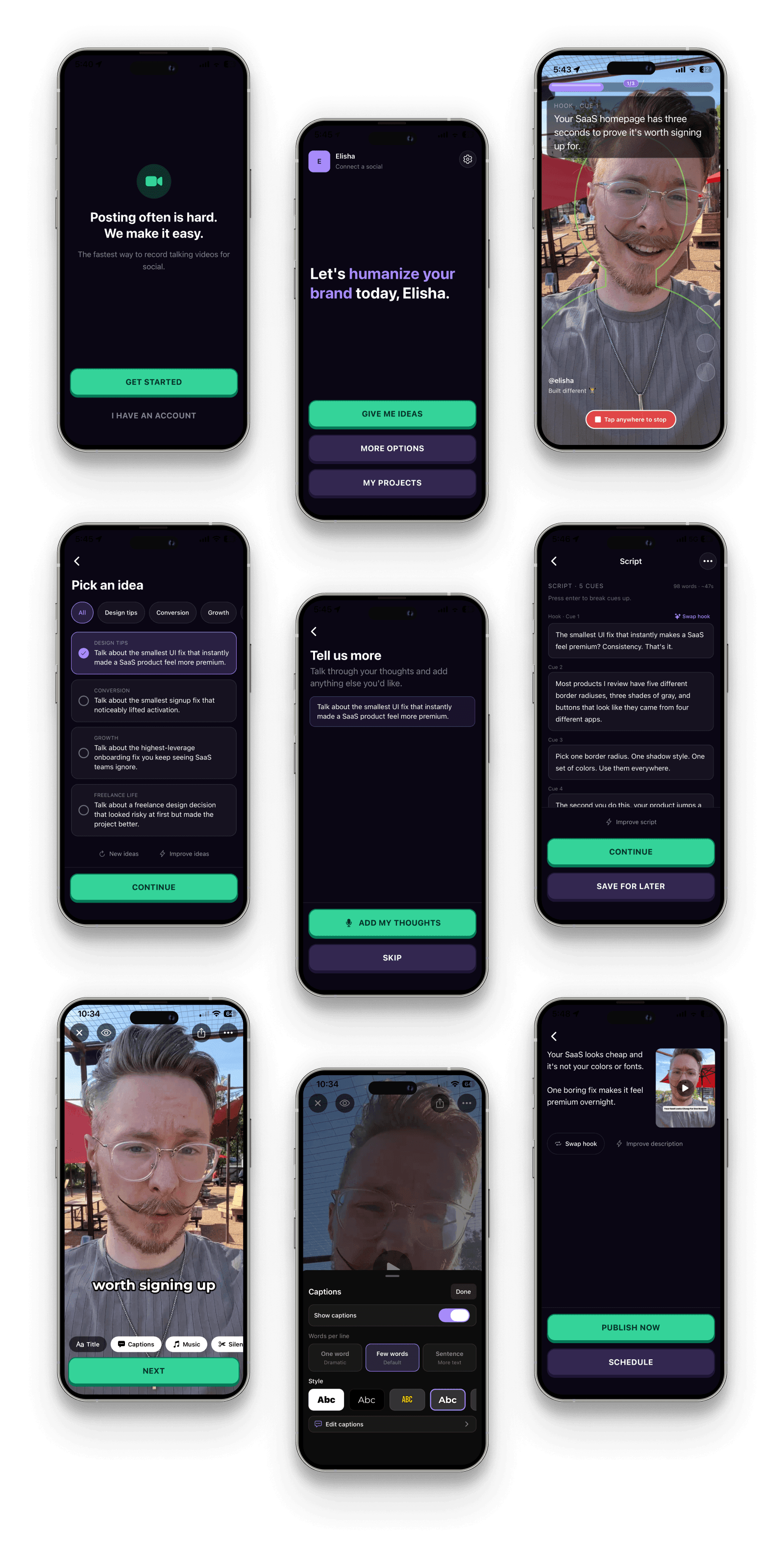
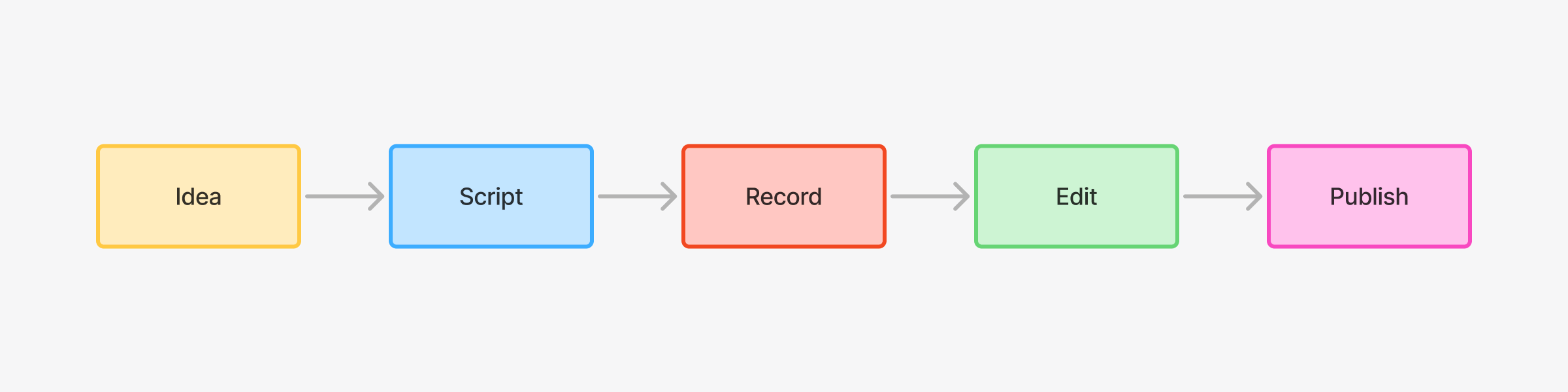
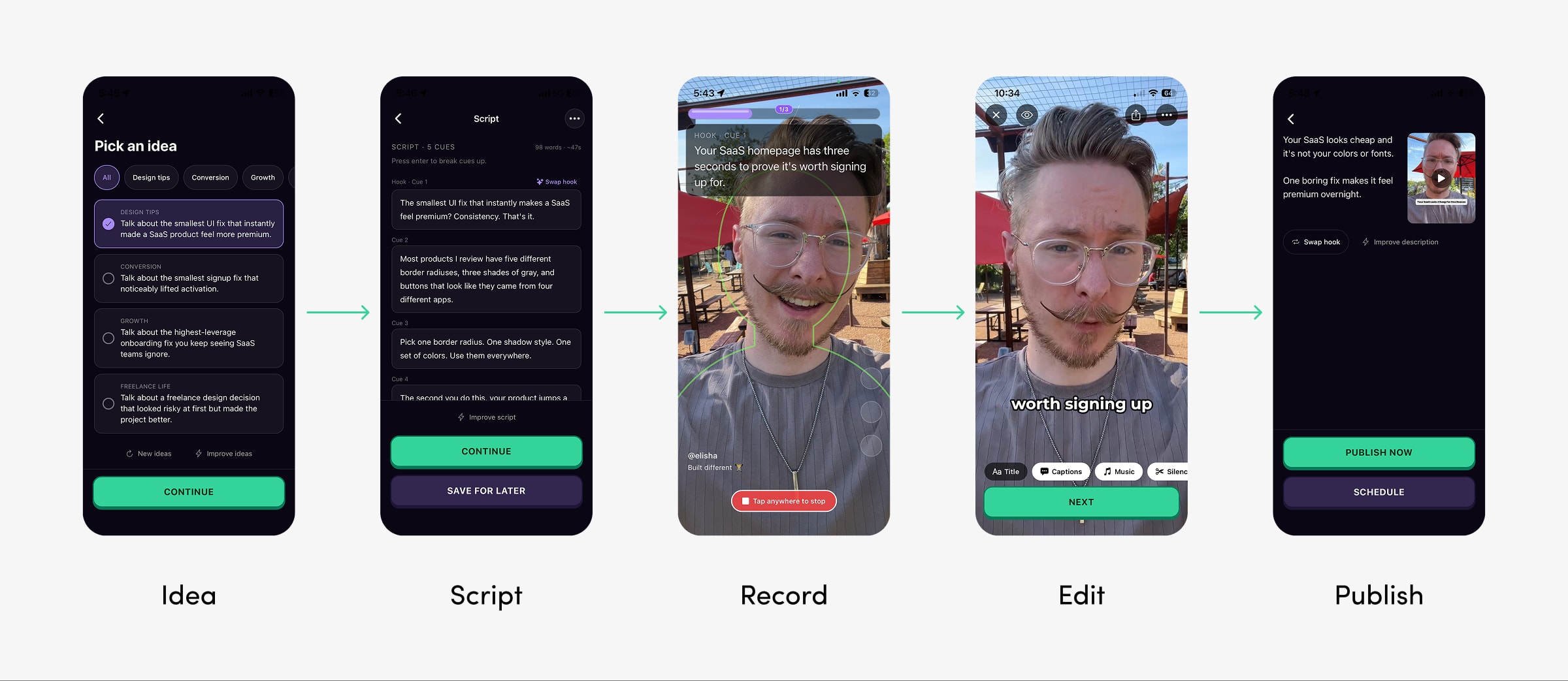
A guided path, not a toolbox. Five stages: Idea, Script, Record, Edit, Publish. Each step has one obvious action, grounded in real user workflows. There's no decision paralysis because there's only one thing to do next.
Refining the product
Right now the product is in beta and we're deep in user testing. I've been running about two interviews a day to refine the experience. A few design decisions have emerged from this phase that I think are worth walking through.
Progressive onboarding, not a feature dump
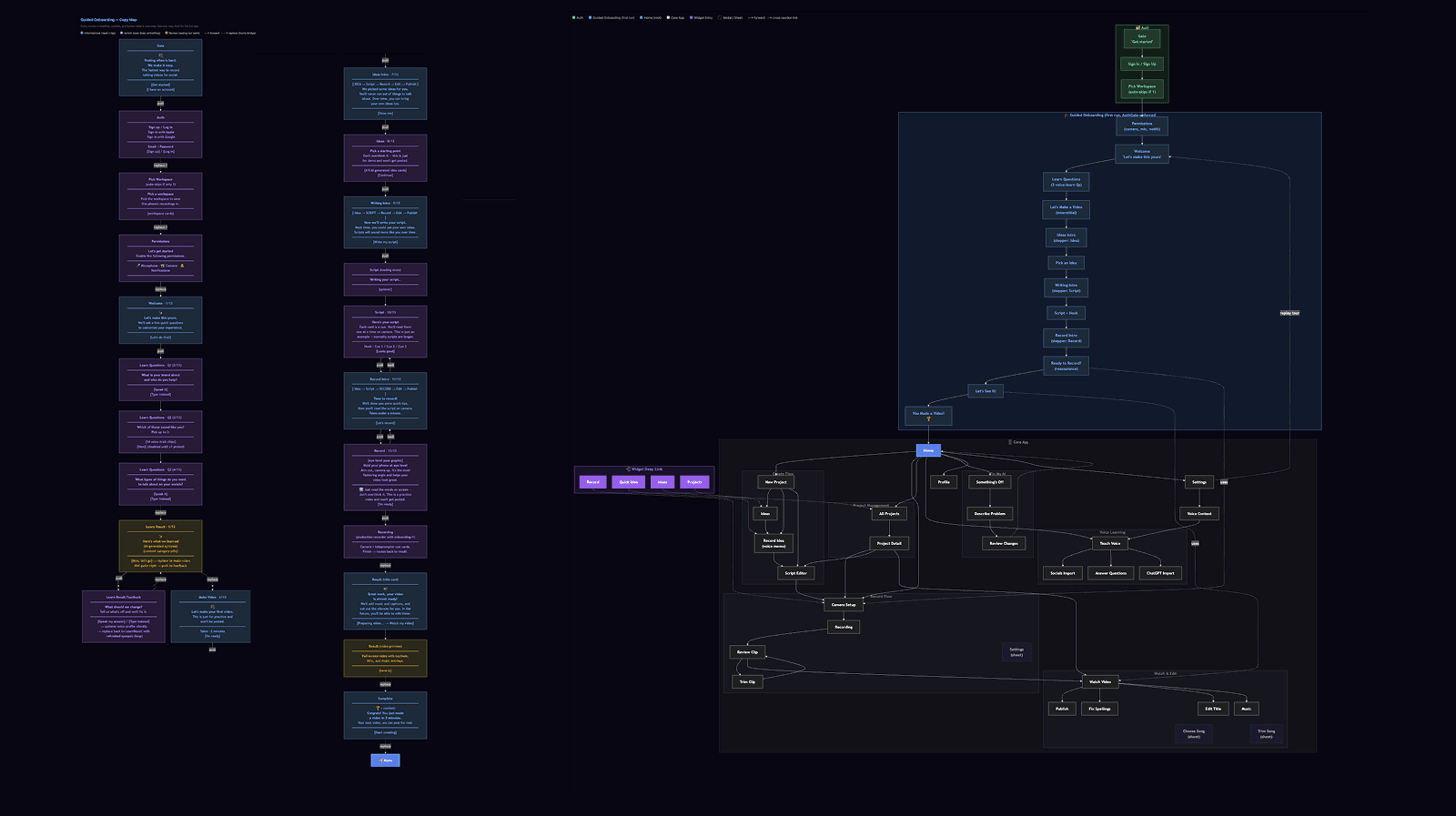
We learned from Marky that the onboarding is one of the most important parts of the product, but it's easy to overload. So we designed InstaClip's onboarding to introduce features progressively over the first few sessions rather than all at once.
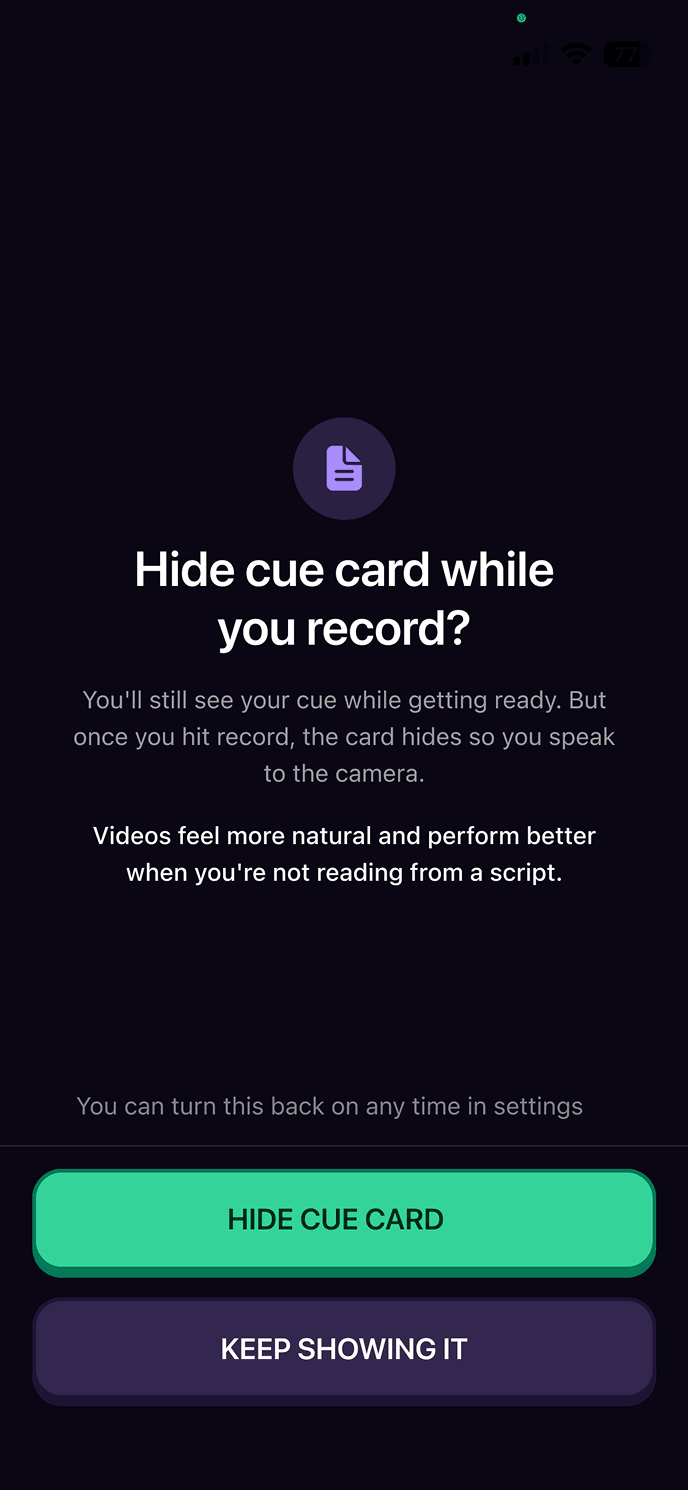
The cue card behavior is a good example. At the beginning we automatically hid it during recording. But after feedback, for the first videos we show the cue card during recording, which feels safer for someone who's never done this before. After a few takes, we surface a prompt: "Hide cue while you record? Videos look more natural and perform better when not reading off a script." We give a reason to act, not just an option to toggle, designing the choice architecture to steer toward the better outcome without removing options (Thaler and Sunstein's Nudge). It eases people into the best version of the product rather than forcing it.
Personalization that happens in the background
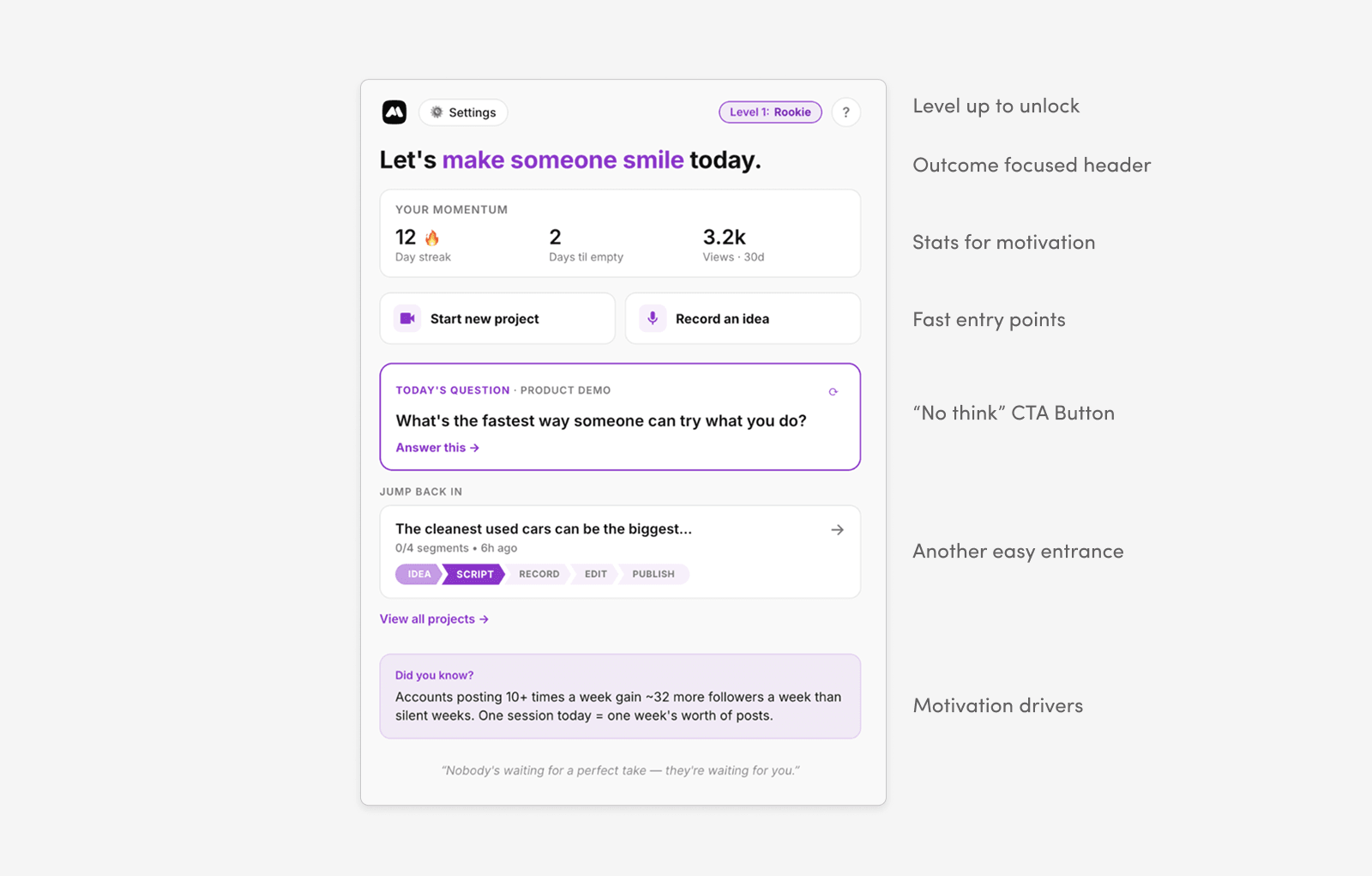
We learned from Marky that most users won't go into settings unprompted. They'll use the core flow and churn if it doesn't work, even when a simple tweak would fix their issue. We wanted someone to use InstaClip for a year and never know settings existed. The product just automatically gets better for them.
The system compares the AI-written script to what the user actually said after recording and uses the delta to adjust how it writes in the future. It learns your vocabulary, your sentence structure, your rhythm. It scans your existing social content to understand your topics and tone, and weights ideas by what performed best. All of this runs in the background so that the more you use the app, the better it gets.
I'm impressed. I'm not even kidding. I never said those words. Vision is like one of my top pillars. Stewardship, another one. I never said those words but it picked that up.
I'm starting to think of AI prompts as raw data, not something the user should have to edit directly. As AI products get more capable and context windows grow, the prompts behind them get bigger and harder to manually tune. So the product should know how to learn on its own.
AI as partner, not replacement
When building InstaClip, I drew a hard line: no AI avatars, no AI-generated video. The AI's job is to summarize, structure, and reduce friction, but the human provides the substance.
Even in the flow, we built in a deliberate friction point. If you pick a suggested starting point, there's always a prompt to add your own context: your take, your experience, your words. We noticed that AI does okay by itself, but it's not going to be specific or memorable without real human input. Having the human contribute as part of the flow is what makes the message feel authentic.
Impact
InstaClip is early, so the full picture is still developing. But early signals from user testing are encouraging.
- 23
- 12+
- 2 mo
I just made a video in two minutes. What? I love it. This is pretty awesome. And this is just the beginning.
I could certainly do that a whole lot easier. This is one line at a time and it's right there on screen and I just read it. So that feels easy. This is doable.
Small details that land
One feature that surprised us in testing was something simple: tapping anywhere on the screen to stop recording. Users kept searching for a dedicated stop button because that's what every other camera app trains you to do. Being able to tap anywhere, without looking away from the lens, turned out to be a high point for some users.
My favorite thing is being able to click anywhere on the screen to stop your video. I even searched for a button to stop recording because I'm so used to having to do that. But to be able to keep your eyes on the video and hit stop, that's a pretty big deal.
The emotional barrier is real
Not every user's problem is time or editing. Some testers had all the tools and all the technical ability, but still weren't posting video. The barrier was emotional. One tester put it bluntly:
I hate myself on video. I've got the tools. I've got all the technology to do it. I just don't like myself on video.
But after going through the flow, something shifted. The ease of the experience didn't fix the insecurity, but it lowered the activation barrier enough to make it feel possible.
It's brainless. It's me getting over my own self-consciousness. But even that, because it's so easy and knowing that I should do more of it, this is a tool that might pull me out of my shell a little bit.
Users responded strongly to the onboarding and voice learning. Testers completed the full flow with minimal guidance, and one offered unprompted to refer the app to her marketing agency before the call ended.
What's next
Making a video easy to record is only half the problem. The other half is getting people to do it again tomorrow, and the day after that. The users who grew fastest were the consistent ones, and that's where we're focusing next.
Building the consistency loop
To succeed on social media, you need to build it into a routine. We're looking at how we can help build recurring behavior. We started playing with streaks, posting schedules, push notifications, and widgets to help make video creation a daily habit rather than the occasional event.
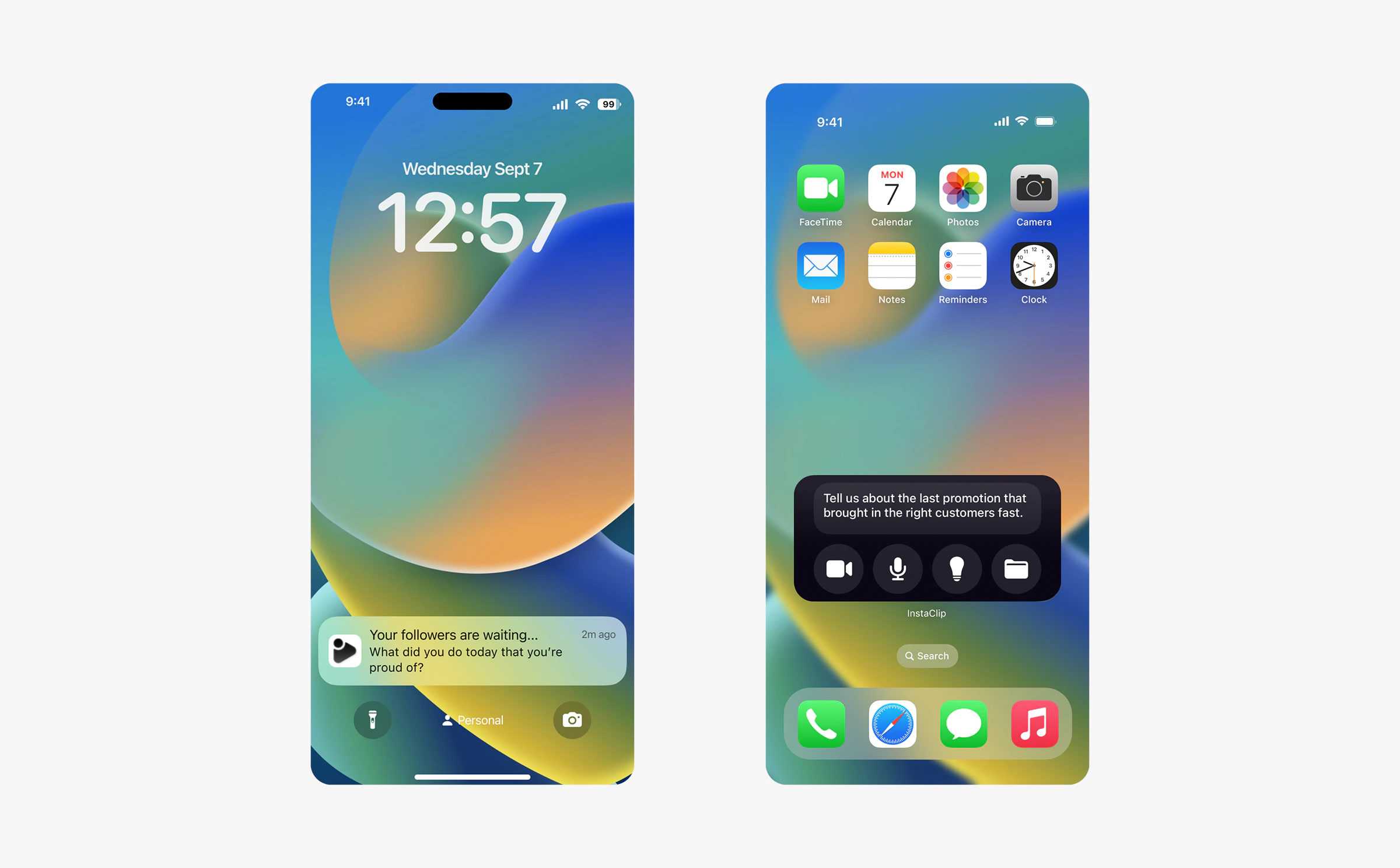
We're also exploring a community and social layer: peer feedback, shared videos, and leagues based on social media size so you're learning alongside creators at your level.
Making the camera less scary
Interviews kept surfacing the same theme: people know they need to post video, they have the tools, but they struggle getting over the emotional hurdle. We're exploring a Duolingo-style training mode, a progression roadmap that builds camera confidence through small, low-stakes exercises. Not a course you watch, but skills you practice inside the app. Our goal is to make the emotional barrier part of the product's job, not just the user's problem. This may be something we explore after getting the initial app off the ground.
I'm kind of excited by what it might pull out of me, in a good way.
Takeaways
Start ruthlessly focused
Marky taught us the risk of feature bloat. Users get confused and can't find the thing they're looking for. With InstaClip, we narrowed in on the problem and only built what was absolutely necessary. We're staying focused on the core job: idea to published talking-head video. This constraint has been very helpful in keeping the product simple enough to use in two minutes.
JTBD was a great UX starting point
The Jobs to Be Done framework helped us define what to build and gave us a strong starting point. Breaking the job into discrete steps (idea, script, record, edit, publish) naturally became the five screens. Each step is one job. Each screen has one action. The framework shaped both the feature set and the flow of using the product. Definitely will be incorporating this methodology in future projects.
What Marky taught us about building InstaClip
Almost every major design decision in InstaClip traces back to something we learned the hard way at Marky. Understand user flows before building. Personalization over customization. Progressive onboarding instead of feature dumps. InstaClip feels like the next iteration of Marky, with three years of hard-won lessons baked in.